
 INSTALLATION

RBO Asia Tradelog
THE SESSION. DOCUMENTED.
Visualise what happens after the Asian range is formed — from breakout detection and methodological filters to session outcome, with the same reference used throughout RBO Asia Edition.
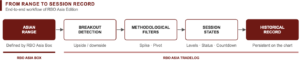
From Range to Session Record
Seeing the Asian range is only the starting point.
RBO Asia Tradelog transforms the ProRealTime chart into a persistent visual record of what happens after the range is formed.
Instead of reconstructing a previous session manually, the chart documents its relevant methodological states, reference levels, filters and final outcome directly on the historical price data.
Tradelog is the documentation and tracking layer of RBO Asia Edition.
It works with the same session reference as RBO Asia Box, maintaining consistency across the ecosystem.
Box defines the range.
Tradelog documents what happens next.
What You See
Once the Asian range is complete and the subsequent session develops, Tradelog can display:
TRIGGER
The breakout reference.
RISK LEVEL
The defined risk reference and its distance.
LEVEL 1
The first methodological target/reference.
LEVEL 2
The second methodological target/reference.
SESSION STATUS
The current methodological state of the session.
SESSION COUNTDOWN
Remaining time until the end of the applicable analysis window.
CONTEXT WARNINGS
When applicable, visual warnings such as:
RESISTANCE OVERHEAD
or
SUPPORT BELOW
identify a nearby pivot in the direction of the detected breakout.
Session States
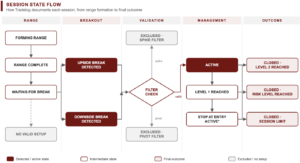
Tradelog uses a consistent state vocabulary to document the development of each session.
|
Displayed state |
Meaning |
|
FORMING RANGE |
Asian range is being formed |
|
RANGE COMPLETE |
Range formation has finished |
|
WAITING FOR BREAK |
Range is complete and no breakout has been detected |
|
UPSIDE BREAK DETECTED |
Breakout detected above the range |
|
DOWNSIDE BREAK DETECTED |
Breakout detected below the range |
|
ACTIVE |
Session setup is active |
|
LEVEL 1 REACHED |
First reference level has been reached |
|
STOP AT ENTRY ACTIVE* |
Reference risk level has moved to entry |
|
CLOSED · LEVEL 2 REACHED |
Session closed after reaching Level 2 |
|
CLOSED · RISK LEVEL REACHED |
Session closed after reaching the defined risk reference |
|
CLOSED · SESSION LIMIT |
Session reached the methodological time limit |
|
EXCLUDED · SPIKE FILTER |
Setup excluded because of the spike condition |
|
EXCLUDED · PIVOT FILTER |
Setup excluded because of the pivot condition |
|
NO VALID SETUP |
No valid setup remained under the defined rules |
The states describe what the methodology detected. They are not trading recommendations or execution instructions.
Methodological Filters
Tradelog can document why a session does not proceed as a valid setup.
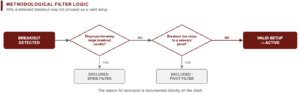
Spike Filter
A disproportionately large breakout candle can cause the session to be identified as:
EXCLUDED · SPIKE FILTER
Pivot Filter
When the breakout occurs too close to a relevant pivot, the session can be identified as:
EXCLUDED · PIVOT FILTER
This makes the reason for exclusion visible instead of requiring the trader to reconstruct it afterwards.
Historical Session Record
One of the key functions of Tradelog is that the information does not disappear when the session ends.
Previous sessions remain documented on the chart.
This allows the trader to review:
- how the range formed;
- whether a breakout occurred;
- breakout direction;
- which methodological levels were reached;
- whether a filter excluded the setup;
- how the session ended;
- whether no valid setup occurred.
The chart therefore becomes a historical visual record of the methodology, rather than simply displaying the current session.
Example of Reading
Illustrative example — EURUSD, 15-minute chart, European summer time.
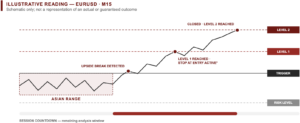
The Asian range has completed.
Tradelog subsequently identifies: UPSIDE BREAK DETECTED
The chart displays: TRIGGER, RISK LEVEL, LEVEL 1, LEVEL 2
with their corresponding distances.
As the session develops, the status may change to:
LEVEL 1 REACHED · STOP AT ENTRY ACTIVE*
A session countdown continues to indicate the remaining analysis window.
If the methodological conditions are subsequently completed, the historical record may show:
CLOSED · LEVEL 2 REACHED
Alternatively, the session could end through the risk reference, the session time limit, or an exclusion condition.
This example illustrates the workflow only and does not represent a guaranteed trading outcome.
Why Tradelog?
SEE THE DEVELOPMENT
Follow the session as it moves from completed range to breakout and subsequent states.
UNDERSTAND THE STATUS
The chart tells you what state the methodology has identified.
SEE WHY A SETUP WAS EXCLUDED
Spike and pivot filters are documented directly on the chart.
KEEP THE HISTORY
Previous sessions remain available for later review.
USE CONSISTENT REFERENCES
Tradelog uses the same underlying session reference as the RBO Asia ecosystem.
What It Does
RBO Asia Tradelog provides:
- Visual session-state tracking
- Breakout detection states
- Trigger and methodological reference levels
- Risk and target/reference distances
- Level progression
- Session countdown
- Spike-filter documentation
- Pivot-filter documentation
- Historical session record
- Alignment with the RBO Asia UTC session reference
What It Does Not Do
RBO Asia Tradelog:
- does not execute orders;
- does not automate trading;
- does not make personalised investment decisions;
- does not guarantee that a displayed level will be reached;
- does not replace evaluation of spread, liquidity, costs, slippage or execution;
- does not constitute financial advice.
The displayed states and levels are methodological references, not instructions to trade.
Designed to Work With RBO Asia Box
RBO Asia Box and RBO Asia Tradelog are separate scripts with complementary functions.
RBO Asia Box
Defines the session structure.
RBO Asia Tradelog
Documents what happens after that structure is formed.
Both use the same underlying session reference, which allows the two components to operate as a coherent workflow.
For this reason, they are delivered together as:
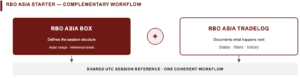
RBO Asia Starter
RBO Asia Box + RBO Asia Tradelog
79 €
Who Is It For?
RBO Asia Tradelog is designed for ProRealTime traders who:
- analyse intraday markets;
- work with session-breakout methodologies;
- want to see the development of a setup directly on the chart;
- want the reason for methodological exclusions to remain visible;
- want to review previous sessions without reconstructing them manually;
- prefer structured visual information over a collection of disconnected indicators.
No programming knowledge is required.
Technical Requirements
Compatible with ProRealTime versions supporting the ProBuilder/ProRealCode functionality required by the published script.
Timeframes: pending final technical validation.
Platform timezone: Europe/Berlin, where applicable to the published configuration.
Minimum ProRealTime version: pending confirmation.
Important Reference
* STOP AT ENTRY ACTIVE
The displayed stop-at-entry reference is a methodological reference. Actual execution may be affected by:
spread · fees · slippage · liquidity · execution conditions
Methodological Notice
RBO Asia Tradelog is software for rule-based visual market analysis and documentation.
Its states, levels, bands and historical records are calculated from defined parameters and market data.
They do not constitute financial advice, personalised investment recommendations, execution instructions or guarantees of performance.

Avis
Il n’y a pas encore d’avis.