

 QUICK &



Shooting Star Indicator for ProRealTime
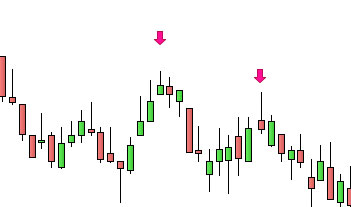
The Shooting Star Indicator automatically identifies and displays Shooting Star candlestick patterns directly on your ProRealTime charts.
Detected Shooting Stars are marked by a magenta arrow above the candle, making them easy to spot when analyzing price movements.
The indicator works across all timeframes and offers customizable detection criteria and filters.

Customizable Settings
Adapt the indicator to your own trading criteria directly from the Configuration menu in ProRealTime, without modifying the code.


Adjustable validation criteria:
- Maximum lower wick length
- Minimum upper wick length
- Bullish trend before the Shooting Star
- Maximum penetration into the previous candle
Available filters:
- Previous candle bullish
- Risk/reward ratio greater than 1
- Shooting Star confirmation by the following candle
These settings allow you to customize which Shooting Star patterns are displayed on your charts.
Characteristics
- Works on all timeframes
- Compatible with ProRealTime V11 and later
- Compatible with the free version of ProRealTime (daily closing prices)
- Settings adjustable without modifying the code
- Automatic and free updates
Video Presentation
Video in French – English subtitles available.
Looking for Shooting Star Patterns Across the Market?
To search for financial instruments matching Shooting Star detection criteria, discover our Shooting Star Screener.
The Indicator displays Shooting Star patterns on your charts, while the Screener helps you find matching instruments across the market.
The Shooting Star Indicator is included with the Shooting Star Screener.
Reviews
There are no reviews yet.